Book Demo

Time cards and production metrics

SysDep shows the hours your team works and what they get done, in the same system they do the work in.

See time cards live

SysDep includes employee time cards and production metrics. Team members clock in and out in SysDep; the time card tracks punches, breaks, overtime, late arrivals, pay periods and pay history, time off and attendance; and Team Productivity shows what each person completed across leasing, maintenance, owners and CRM, e-sign and communication, including late-rent notes, emails sent and phone calls.

How it works

  1. Step 1Clock in where you workTeam members punch in and out inside SysDep, with breaks.
  2. Step 2Hours add up on their ownRegular hours, overtime, late arrivals and time off land on each pay period’s time card.
  3. Step 3See what got doneTeam Productivity rolls up each person’s output by area overnight.
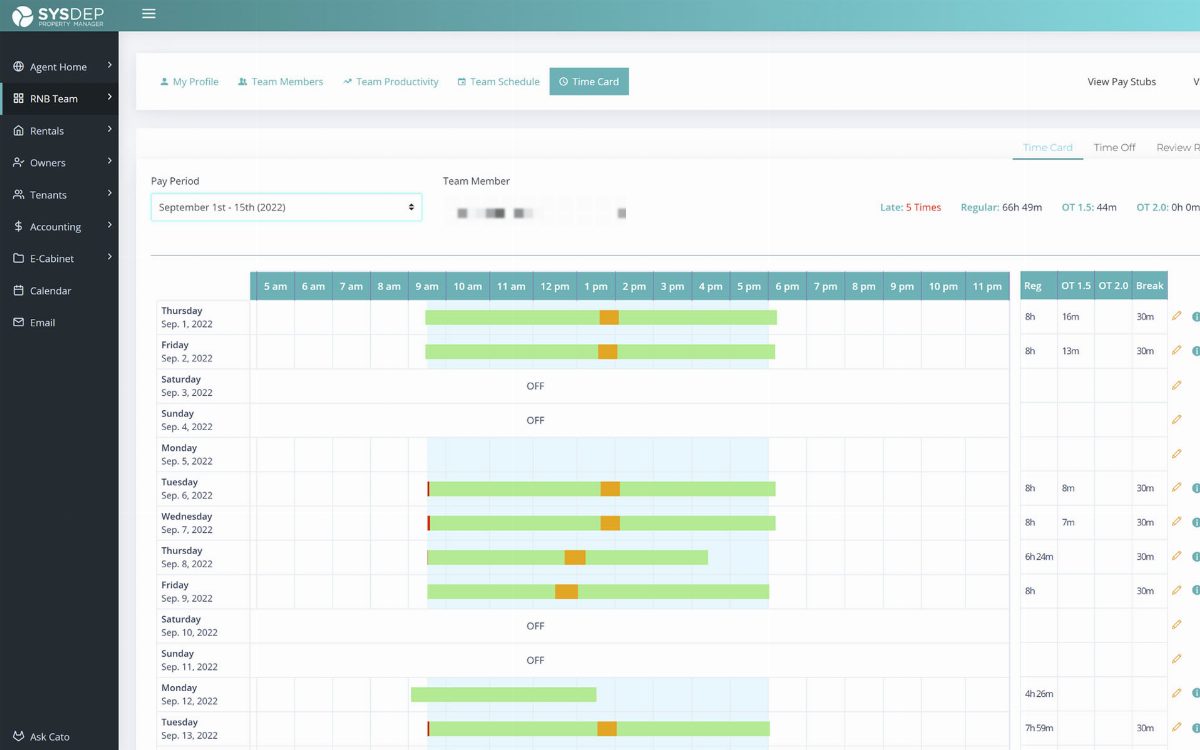
SysDep time card for one pay period, showing daily punches, breaks, regular hours and overtime
The SysDep time card: daily punches and breaks, regular hours, overtime and late arrivals for a pay period.

What does the SysDep time card track?

  • Clock-in and clock-out punches for each day, with breaks
  • Regular hours and overtime at 1.5x and 2.0x
  • Late arrivals
  • Pay periods and pay history
  • Time-off requests
  • Attendance occurrences
  • Review requests when a punch needs correcting

What are production metrics?

Team Productivity shows what each team member actually got done, broken out by area of the business. The numbers roll up overnight, and a custom view lets a manager choose the measures that matter for each role.

  • Leasing: tenants, rentals, expiring leases and month-to-month tenancies
  • Maintenance
  • Owners and CRM
  • E-sign
  • Communication, including late-rent notes, emails sent and phone calls

Why keep time cards in the property management system?

Because hours and output belong side by side. When the time card, the team schedule and the production metrics live in the same system as the work itself, a manager can see who worked when and what they accomplished without reconciling a separate time-clock app against a separate task tracker.

Hours and output, side by side — in the system where the work happens.

No separate time clock to reconcile.

Questions about Time Cards & Production Metrics

Does SysDep have time cards for employees?

Yes. Team members clock in and out inside SysDep. The time card tracks punches, breaks, overtime, pay periods and pay history, time-off requests and attendance, and staff can request a review when a punch needs correcting. Managers see hours and production for the same people in the same system.

What are production metrics in SysDep?

Team Productivity in SysDep shows what each team member actually got done, broken out by area: leasing (tenants, rentals, expiring leases and month-to-month), maintenance, owners and CRM, e-sign, and communication, including late-rent notes, emails sent and phone calls. The numbers roll up overnight, and a custom view lets managers choose which measures matter for each role.

Can property management software track employee hours and productivity?

Yes. SysDep includes a time card for every team member, with clock-in and clock-out punches, breaks, regular hours, overtime at 1.5x and 2.0x, late arrivals, pay periods, pay history and time-off requests. Team Productivity then shows what each person completed across leasing, maintenance, owners and CRM, e-sign and communication. Hours and output live in the same system as the work, so managers do not reconcile a separate time clock.

See your team’s hours and output on a demo call.

15 minutes. Free data migration and setup.

Book a 15-minute demo